Turbo Soccer Beginner Guide: How to Play Your First Match
Learn how to play Turbo Soccer: join the experience, finish the tutorial, queue your first casual match, and master drive, boost, jump and scoring basics.
Turbo Soccer (Roblox place 101880234193261, currently Beta 1.0, developed by zDashi) is car soccer: you drive a rocket-powered car around an enclosed arena, ram an oversized ball into the opposing net, and try to outscore your opponents before the timer expires. That is the entire job of your first match. This guide walks you from first spawn through a completed game — how to get into one, the three inputs that matter, what scoring and the HUD look like — and then lists the small set of habits worth practicing before you chase advanced moves.
The short version: join the official experience, clear the forced tutorial, open Play and pick Casual (1v1, 2v2 or 3v3), then drive with WASD, hold Left Mouse to boost, and jump with Right Mouse. Hit the ball toward the other team's net, watch the HUD timer, and don't panic when the clock hits 0:00 — play continues until the ball touches the floor.
How to start your first match
- Join the official experience. Open Roblox place 101880234193261 (Turbo Soccer : Beta 1.0).
- Let the tutorial and profile setup run. New accounts are walked through a guided tutorial covering throttle (W), boost (hold Left Mouse), drift/powerslide and flips (Right Mouse jump with a held direction), plus the camera zoom. When it ends, the game prompts you to create a profile name — type one and continue. First-session recordings in several languages show this exact tutorial-then-profile flow, so expect it on a fresh account.
- Open the Play menu and choose a mode. Use Free Play to practice or Casual for your first real match. Guides suggest the order Free Play → Casual → Ranked, so you can safely ignore Ranked for now.
- Queue a casual playlist. Casual offers 1v1, 2v2 and 3v3. Recorded sessions find opponents quickly, and an empty lobby can fill with bots, so you'll get a match either way. If you'd rather warm up first, you can jump into Free Play while the queue runs — and Free Play awards XP just for driving around and taking practice shots. The menu also lists mini-game modes like Four Goals and Car Dash; they're fun side content, but start with the standard playlists (see Turbo Soccer match modes).
- Wait for the countdown and hit kickoff. A 3-2-1 countdown drops you into kickoff. Boost straight at the center ball and keep all four wheels on the ground — the reason why is in the practice section below.
The three inputs that matter first
On PC, Turbo Soccer runs on WASD plus the mouse. These five actions cover everything a first match demands:
| Action | PC input | What it does in a first match |
|---|---|---|
| Drive and steer | W A S D | W accelerates; the other keys steer and reverse |
| Boost | Hold Left Mouse Button | A nitrous burst used to win kickoffs, chase stray balls and rush back on defense. Use short taps — held boost overshoots the ball |
| Jump | Right Mouse Button | Lifts the car off the ground; holding or timing the click lets it float slightly to contest high bouncing balls |
| Flip | Right Mouse jump, hold a direction, press jump again mid-air | Redirects the ball with force. Practice in Free Play before using it in a real game |
| Ball contact | Approach from behind the ball, face the goal, drive through it | The basic first-match way to hit the ball toward the net |
One boundary worth knowing: the official Roblox listing only publishes platform-level schemes — PC: WASD + Mouse, mobile: on-screen controls, console: compatible controller. The Left Mouse boost and Right Mouse jump bindings above come from third-party guides and tutorial footage, and the game is in Beta, so menu labels and binds can change between updates. Detailed mobile and console button maps weren't documented at the time of writing, and mobile players report that precise flips and saves feel clunky. The full device-by-device table lives in our Turbo Soccer controls guide.
Scoring, the HUD, and how a match ends
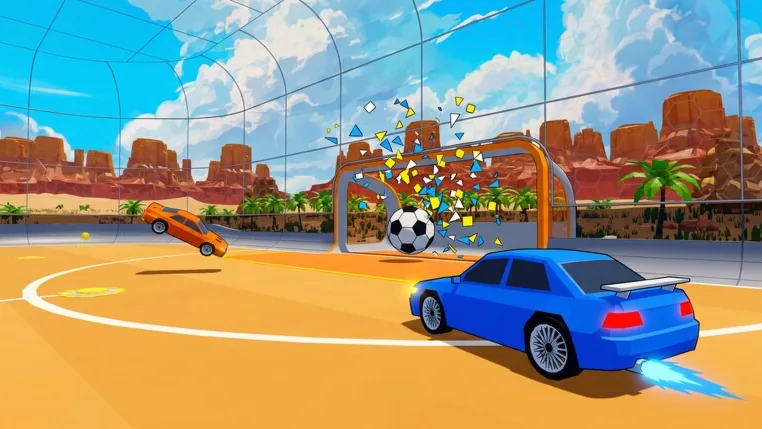
To score, approach from behind the ball, face the goal, and drive through it. The game is friendlier to beginners than it looks — playtesters note the ball appears noticeably large relative to the net, which makes basic shots and defensive clears easier to land. Goals also register unmistakably: footage shows a shot confirming with an on-screen Goal successful message and a replay offer afterward, so you'll always know when one counts. When the ball lands near your own net instead, your job flips: clear it out fast before the other team pounces.
The HUD tells you the rules of the match you're in. Each match displays its own score limit and timer on screen — treat those numbers as the rules for that game, because no single fixed duration applies across modes. Observed matches have ranged from roughly a minute of play to a three-minute bot match, and players describe results as time-based: when the timer expires, the higher score wins.
Three rules extend that basic flow, and all of them are active from your first casual match:
- The zero-second rule. When the timer reaches 0:00 the match does not end immediately — play continues until the ball touches the arena floor. A last-second shot still counts, so defend until you hear the whistle.
- Sudden-death overtime. If the score is tied at the end of regulation, the first team to score in overtime wins instantly.
- Demolitions. Ramming an opponent at top boost speed destroys their car and forces a short respawn — which can leave their net wide open. It works both ways, so don't site-see in front of your own goal.
What to practice after your first match
One beginner guide sums up the best start in one line: learn boost, jump and flip, then play normal matches and practice all three while controlling the ball — not just driving fast. In practice, that breaks down into four habits:
- Short boosts. Hold boost in brief taps to line up your shot instead of rushing past the ball. Full held boost overshoots the ball and can spin the car out (more boost tips).
- Grounded driving. Overusing jump is the most common beginner trap — holding Right Mouse floats the car, and stray clicks launch you over the ball instead of through it. Keep four wheels on the turf until you deliberately need an aerial block or a flip shot. That includes kickoffs: boost straight at the center ball while grounded, because a 50/50 collision can launch a jumping car out of position.
- Flips in Free Play. Solo Free Play launches from the main menu and awards XP for practicing shots and flips, so your pre-match warmup counts toward progression. Practice flips there before you try aerial plays in ranked lobbies.
- Ball Cam. Turn Ball Cam on whenever you lose track of the ball. It is the single fastest fix for the disorientation every new player feels.
Once those feel comfortable, take them into casual 1v1 to work on ball control and defense (Turbo Soccer ball control) — simply driving around at full speed does not win games. In 2v2 and 3v3, add the first team habit: don't chase the ball into the same corner as a teammate. One player attacks while the other covers mid-field or the goal line, because two misses in a row leave your net completely unguarded.
On the progression side, check the gift section regularly — daily rewards give out XP and packs, with the day-seven reward including an epic pack — and leveling unlocks cars too (one progression reward grants a car at level 15). Promo codes appear in the game as well; the Turbo Soccer codes page tracks which are currently working.
The full walk-through below puts those habits together across a real first session — controls, car choice, and the matches in between:
Common first-session problems (and fixes)
- Accidental mouse clicks. Boost and jump share the mouse, so frantic moments produce unwanted jumps. First-session footage says it best: "if you click the mouse, it can jump — don't click the mouse unless it's necessary." Keep a relaxed grip.
- Boost spin-outs. Boosting amplifies your momentum and can spin the car. Release Left Mouse momentarily to regain control, then tap boost again once you're facing the target.
- Camera confusion. Players report camera management as the single biggest difficulty for newcomers — driving past the ball or misjudging angles after the camera shifts mid-turn. The ball-cam habit helps immediately, and the settings tab lets you tune camera sensitivity to taste (Turbo Soccer camera settings).
- Uneven opposition. Because the game is in Beta, casual queues can match absolute beginners against experienced players who dribble, intercept and hit aerial shots. Recorded first sessions ended in losses (0-2 and 2-0), and the creators treated that as normal learning. Expect a few losses early — they're the tuition fee, not a sign you're playing wrong.
Play your first official match with exactly this much: join, tutorial, casual queue, drive-boost-jump, score into the far net, and hold your defense past 0:00. After that, the focused guides pick up where this one stops — the controls guide for every binding and the ball-control guide for your first real drills.
Related Guides
Controls for PC, Mobile, and Console
Confirmed PC keybinds, a player-tested controller layout, and mobile touch roles, with unknown binds clearly flagged.
Ball Control Guide
Learn how approach lines, contact points, and hitbox shapes steer the ball, and use the landing circle to position your car.
Kickoff Guide
A repeatable kickoff: boost straight at the center sphere, then make the right first-touch call every match.
Codes: Checked List and How to Redeem
Check Turbo Soccer code statuses and their source check dates, then redeem a code in Settings with exact entry steps and fixes.